01
Put your favorites first.
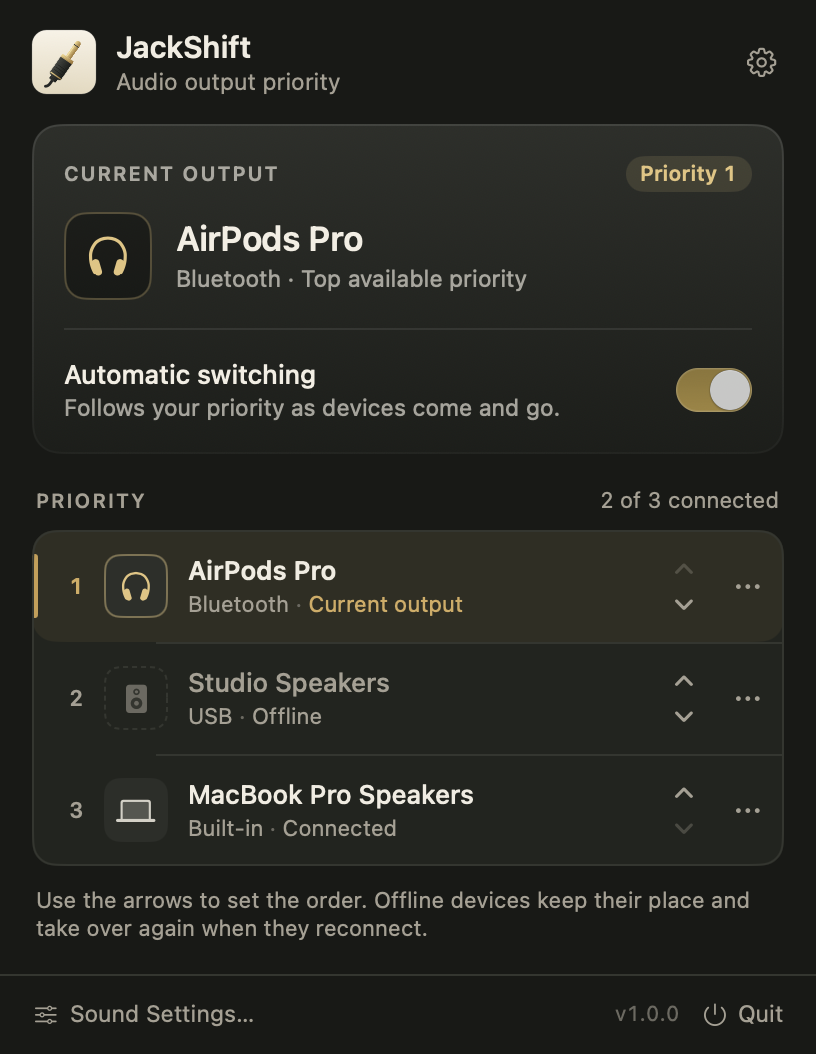
Arrange your audio outputs in the order you prefer. JackShift remembers the list, including devices that are offline.
 JackShift.
See the demo
JackShift.
See the demo
A little utility for your Mac
Your headphones. Your speakers. Your rules.
JackShift keeps your Mac on the audio output you actually want.
In development · macOS 13+ · Apple silicon & Intel
ONE LESS THING TO FIDDLE WITH
Connecting a display shouldn't send your music somewhere else. Give your Mac a preference it can stick to.
Arrange your audio outputs in the order you prefer. JackShift remembers the list, including devices that are offline.
When your setup changes, the highest-priority available device becomes your Mac's default output.
Disconnect a device and the next one takes its place. Your favorite gets its turn again when it reconnects.
SMALL APP. EVERYDAY DIFFERENCE.
A 34-second silent walkthrough.
Actual app views, with example devices.
Native on your Mac. No audio recording. No extra audio driver.
THOUGHTFULLY OUT OF THE WAY
Everything you need to settle your audio setup. Close the panel and let it do its thing.
Priorities survive restarts and reconnects. Offline devices keep their place in line.
Pick an output manually and pause automation. Resume your priority list whenever you're ready.
Exclude outputs from automatic selection. Newly discovered virtual outputs are opt-in by default.
Choose to launch at login. Open the compact panel from the menu bar or your Dock.
Optionally send alerts and sound effects to the same output, when the device supports them.
JackShift changes the selected output. It doesn't record your audio, need microphone access, or send telemetry.
BEFORE YOU PLUG IN
It changes your Mac's default audio output to the highest-priority connected device on your list. You can also choose to switch system sound effects. It does not process audio or change your microphone.
Apps that follow the macOS default output can use the device JackShift selects. Music software, meeting apps, and other apps with their own output setting may keep that selection. JackShift doesn't override their internal audio settings.
New devices appear at the bottom of the list. Move one up once to give it a higher priority. When you reconnect it later, JackShift remembers its place. Virtual outputs are initially excluded unless already selected in macOS.
Yes. Use a device's menu to select it and pause automatic switching. You can also change the output in macOS; JackShift respects that choice until a device connection or priority change triggers the next check.
JackShift runs on macOS 13 Ventura or later, on Apple silicon and Intel Macs. It works with output devices macOS makes available, including built-in speakers, USB interfaces, Bluetooth headphones, and compatible displays. A device may still need its manufacturer's driver.
The first public download is being prepared. Pricing hasn't been finalized. Watch the demo to see the current app in action.
No. The desktop app doesn't record audio, send telemetry, or connect to a network service. Your device list and preferences stay on your Mac. This website is hosted on Vercel; it has no advertising trackers or analytics scripts.
SET IT ONCE. SOUND SORTED.
Put your favorite devices first. JackShift handles the next switch.
Watch the demoThe public download is being prepared. Demo available above.